Case Study: Ignition Batch Tracking System
A real-time batch logging and reporting system built using Ignition Perspective, Jython tag event scripting, SQLite database integration, and Named Query bindings
Project Overview
This project implements a full-stack batch tracking solution within the Ignition SCADA platform, targeting the Maker Edition environment. The system covers the complete production record lifecycle: operator data entry via a Perspective HMI screen, event-driven database writes triggered by a boolean completion tag, persistent storage in a SQLite relational database, and real-time record retrieval via Named Query bindings surfaced in a live Perspective Table component. The architecture mirrors the data flow patterns found in production MES (Manufacturing Execution System) integrations, where traceability, auditability, and low-latency record retrieval are primary requirements.
Problem
Industrial batch production environments require complete traceability of each production run for quality control, regulatory compliance, and operational reporting. Manual paper-based logging introduces transcription errors, delayed visibility, and gaps in audit trails. The engineering requirement was to replace this manual process with an event-driven digital system capable of capturing batch metadata atomically at the moment of completion, persisting it to a structured relational store, and surfacing historical records to operators in real time — without requiring a page refresh or manual query execution.
Solution
- Operator Input Fields — Perspective text and numeric input components bound to memory tags; capture Recipe Name, Batch Duration, and Operator ID for the active production run
- Memory Tags — Gateway-scoped tags acting as the live data store for operator-entered values; decouples the UI layer from the scripting layer
- Batch_Complete Trigger Tag — A boolean memory tag that acts as the write signal; a rising-edge transition on this tag fires the tag value change event script
- Tag Event Script (valueChanged) — A Jython script subscribed to the
Batch_Completetag; executes a parameterised SQL INSERT usingsystem.db.runPrepUpdateand reads live tag values viasystem.tag.readBlockingat the moment of trigger - SQLite Database — Configured as a named database connection in the Ignition Gateway via JDBC; provides persistent, structured storage for all batch records
- Named Query — A reusable, Gateway-managed SQL SELECT query bound to the Perspective Table component; parameterised queries enforce separation between data access logic and the UI layer
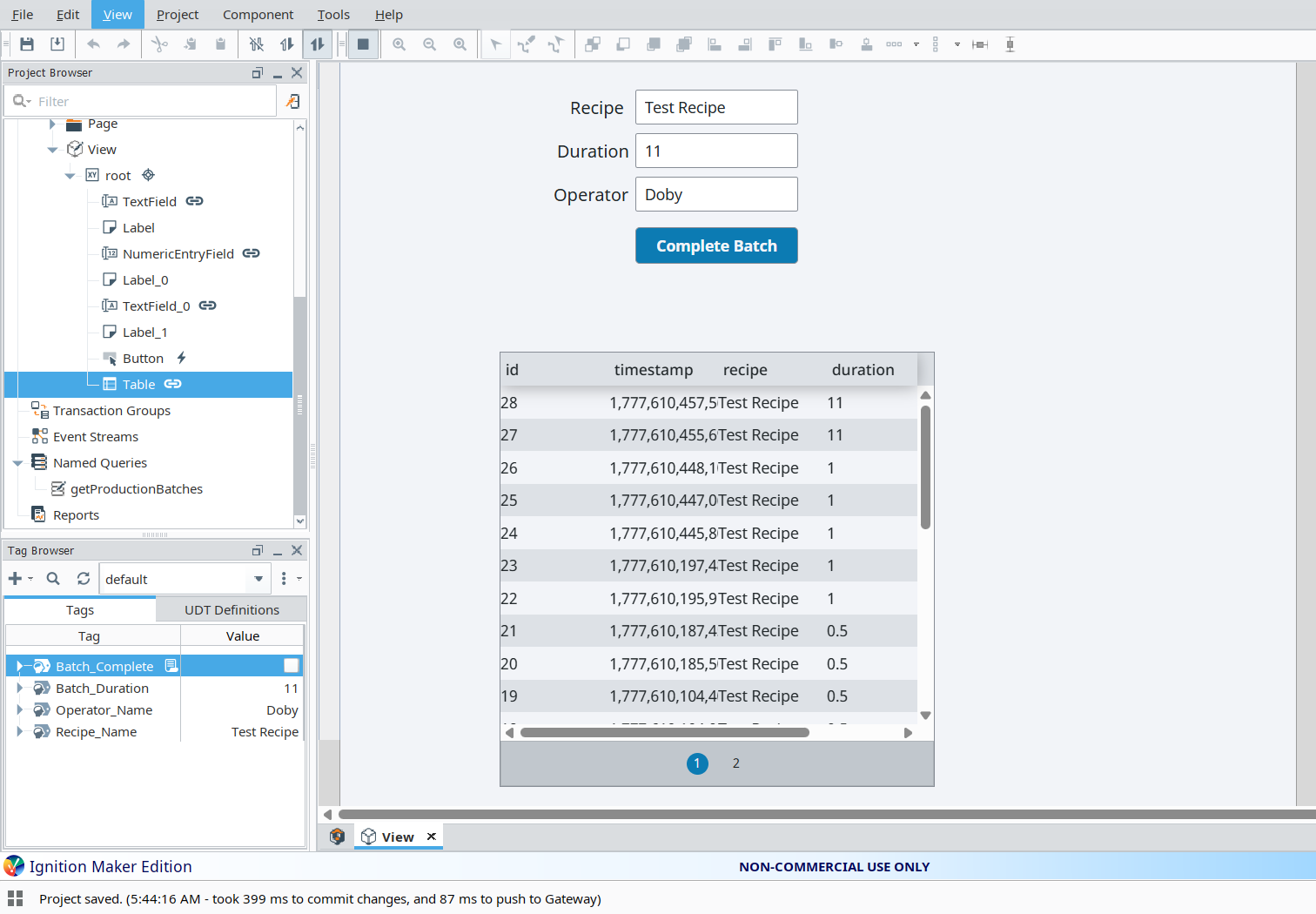
- Perspective Table Component — Displays the full batch history in real time via Named Query binding; automatically reflects new records without operator intervention
When the operator activates the Complete Batch button, it writes TRUE to the Batch_Complete memory tag. The Gateway detects the rising-edge value change and immediately dispatches the registered valueChanged tag event script. The script reads the current values of Recipe_Name, Batch_Duration, and Operator_Name from the tag provider using blocking reads to guarantee value consistency, then executes a prepared INSERT statement against the production_db connection. The Perspective Table, bound to a Named Query polling the same database, updates its dataset to reflect the newly written record, completing the end-to-end data pipeline.
Project Screenshots
Database Structure
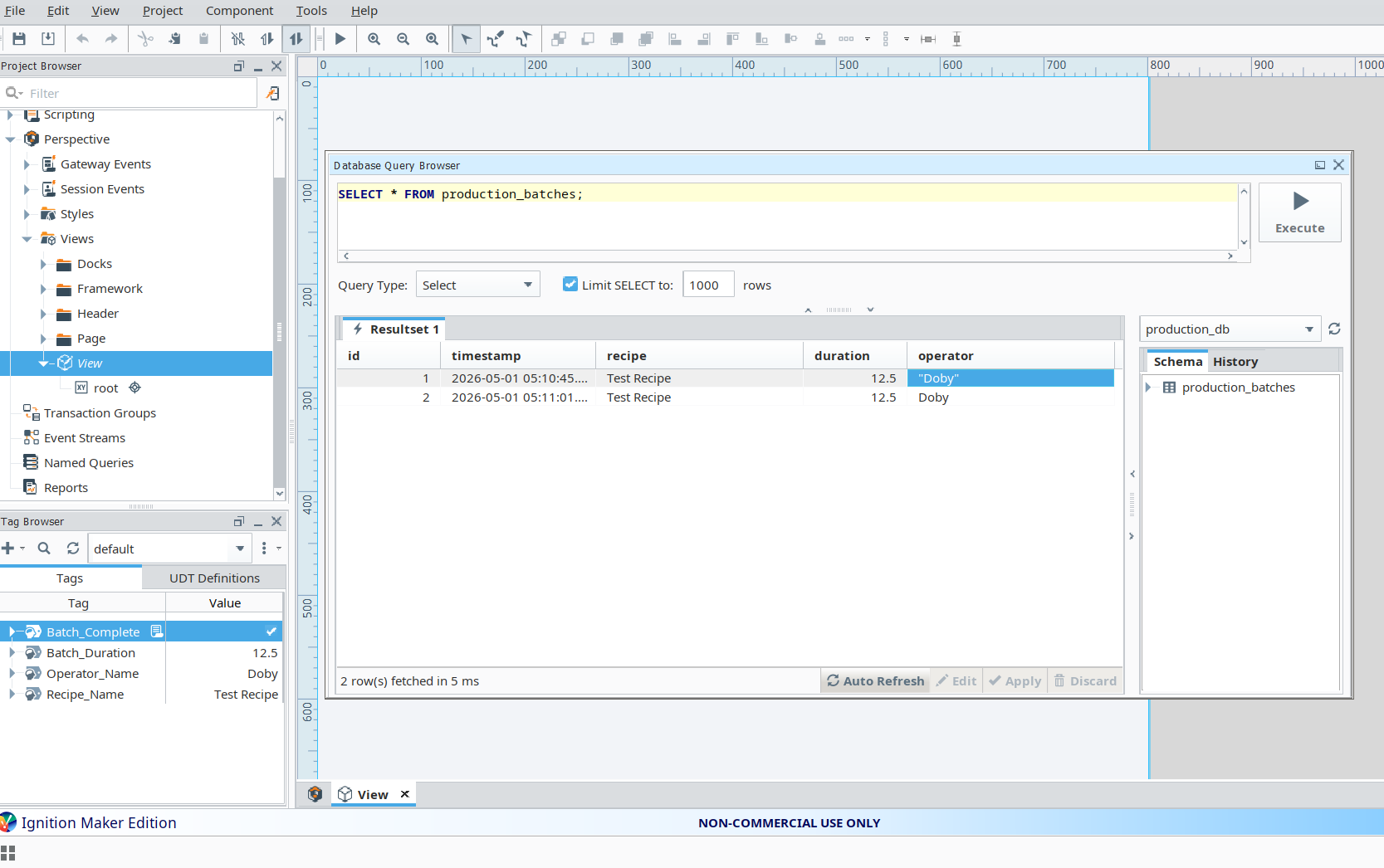
Table: production_batches
    id         : INTEGER (Primary Key, Auto-increment)
    timestamp  : DATETIME  -- populated via system.date.now() at script execution time
    recipe     : TEXT      -- recipe name read from [default]Recipe_Name tag
    duration   : REAL      -- batch duration in operator-defined units
    operator   : TEXT      -- operator identifier read from [default]Operator_Name tag
Core Script Logic
def valueChanged(tag, tagPath, previousValue, currentValue, initialChange, missedEvents):

    # Guard clause: only execute on a confirmed rising-edge transition
    # Prevents duplicate inserts on Gateway restart or initialChange events
    if currentValue.value == True and previousValue.value == False:

        system.db.runPrepUpdate(
            "INSERT INTO production_batches (timestamp, recipe, duration, operator) VALUES (?, ?, ?, ?)",
            [
                system.date.now(),
                system.tag.readBlocking(["[default]Recipe_Name"])[0].value,
                system.tag.readBlocking(["[default]Batch_Duration"])[0].value,
                system.tag.readBlocking(["[default]Operator_Name"])[0].value
            ],
            "production_db"
        )
Testing & Debugging
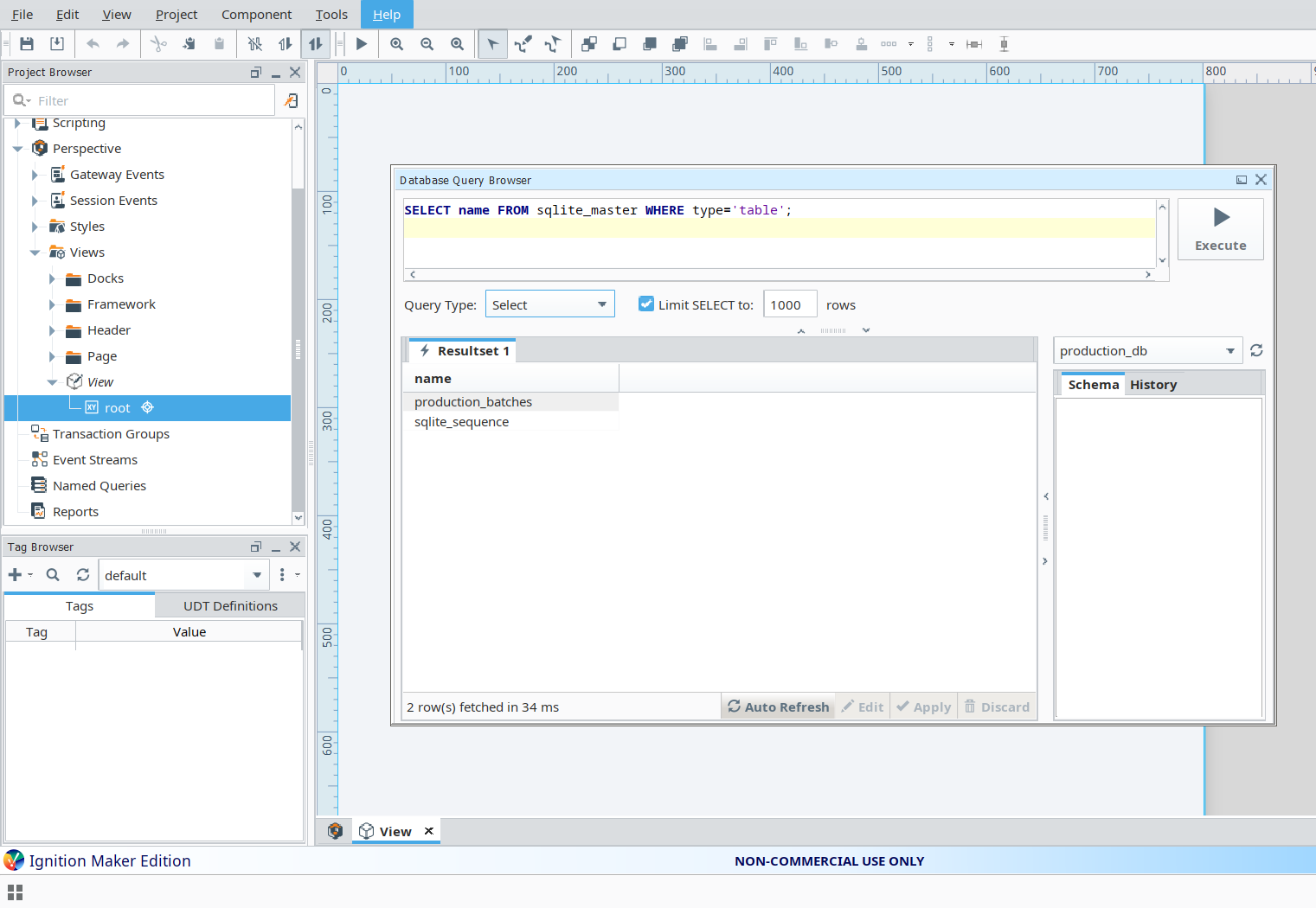
System validation was performed by manually driving tag values through the Ignition Tag Browser and using the Query Browser to inspect database state after each trigger event. The following test cases were executed and confirmed:
- Manually writing tag values in the Tag Browser to simulate operator input, then asserting
Batch_Completeto TRUE to verify the event script fires correctly - Confirmed each INSERT via the Ignition Query Browser, validating that timestamp, recipe, duration, and operator fields were populated accurately from live tag reads
- Verified rising-edge guard clause behaviour by asserting
Batch_Completemultiple times in sequence to confirm no duplicate records were written - Inspected script execution errors in the Ignition Gateway logs to diagnose a JDBC path misconfiguration during initial database connection setup
- Resolved a Perspective Table update failure caused by a dataset-vs-JSON type mismatch in the Named Query binding configuration
- Identified and corrected a critical Designer-vs-Gateway runtime discrepancy: script changes were not taking effect because the project had not been saved and published to the Gateway before testing
Challenges Faced
- Configuring the SQLite JDBC driver within the Ignition Gateway's database connection manager, including correct absolute file path specification for the
.dbfile - Understanding Ignition's Designer-to-Gateway publishing model and its impact on script and binding changes during iterative development
- Resolving a type mismatch between Ignition's internal dataset format and the JSON array format expected by the Perspective Table component's Named Query binding
- Correctly structuring the Named Query to return a dataset compatible with Perspective's table binding, including column name alignment
- Diagnosing tag event script failures using Gateway diagnostic logs, where Python (Jython) runtime exceptions are surfaced separately from Designer script errors
- Ensuring that
system.tag.readBlockingcalls within the event script returned current, committed tag values rather than stale cached reads
Key Learning Outcomes
- End-to-end SCADA database integration: Gateway connection configuration, JDBC driver setup, and SQL execution via Ignition scripting functions
- Ignition Named Query architecture: parameterisation, dataset return types, and binding to Perspective components
- Tag event scripting in Jython: rising-edge detection, blocking tag reads, and prepared statement parameterisation for SQL injection prevention
- Ignition's Designer/Gateway publishing model and its implications for iterative development and live system debugging
- Perspective component binding patterns: distinguishing dataset and JSON binding modes and selecting the correct type per component
- Real-time data flow architecture in SCADA: from operator action through event script execution to live UI refresh without polling
- Full-stack SCADA debugging methodology: correlating Gateway logs, Tag Browser state, Query Browser results, and Designer runtime behaviour
Tools Used
- Ignition Maker Edition — Gateway and Designer environment for SCADA application development
- Ignition Perspective — Web-based HMI framework for operator interface design and component binding
- SQLite — Embedded relational database used as the production batch record store via JDBC connection
- Ignition Named Queries — Gateway-managed, reusable parameterised SQL queries bound to Perspective components
- Tag Browser and Memory Tags — Live tag provider for operator input staging and event trigger management
- Python / Jython Scripting — Gateway-side event scripting for tag value change handling and database write execution