Case Study: Ignition Live Report System
A real-time SCADA reporting and alarm intelligence system built in Ignition Perspective, combining a frontend operator HMI with a backend Gateway Timer Script for continuous, session-independent alarm evaluation
Project Overview
This project implements a small but complete SCADA reporting solution in Ignition Maker Edition. It pairs an operator-facing Perspective view with a Gateway-scoped Timer Script ("Scientist 7 Alarm Intelligence") that continuously evaluates tank conditions and writes the most recent alarm into a memory tag for the UI to consume.
The architecture deliberately splits responsibility across two execution scopes: the Perspective view handles operator interaction and report rendering, while the Gateway Timer Script handles continuous tag evaluation and alarm classification. This is the same scope-separation pattern used in real production Ignition deployments.
Problem
Operators viewing raw tag values rarely get the context they need to make decisions quickly. A live tank level of "95" is meaningless without knowing whether that crosses an alarm threshold, whether the pump is running, and what the most recent alarm event was.
The engineering challenge was therefore:
- Continuously evaluate process tags for alarm conditions, regardless of whether any operator client is currently connected
- Persist the most recent alarm event somewhere durable so any session can read it
- Render a human-readable scientist-style report inside the Perspective view that reflects live state
Solution Architecture
- Pump indicator with percentage display and ToggleSwitch for control
- Two Slider components (Slider, Slider_0) for adjusting tank inputs live
- "Generate Scientist Report" Button that triggers the report rendering script
- ReportLabel container with a child Label that receives the formatted output text
- Output reads back the live values, e.g.
Level: 95.0 Temp: 70.0 Pump: true
- Delay: 2,000 ms Delay Type: Fixed Delay Threading: Shared
- Reads
TankLevelandTankTempvia a batchedsystem.tag.readBlocking()call - Reads
PumpRunningand uses it as a guard — alarms are only evaluated when the pump is actually running - Classifies alarms against engineering thresholds:
level > 80→ "High Tank Level",temp > 90→ "High Temperature" - Joins multiple active alarms into a single string with
" | "as a separator - Compares against the previous
LastAlarmEventvalue and only writes when it has changed, avoiding redundant tag writes every cycle
Choosing the Gateway scope for alarm evaluation was deliberate. A Perspective Session script would only run while a client view is open, which means alarms would silently stop being evaluated as soon as the operator closed the page. Putting the logic in a Gateway Timer Script means the evaluation runs on the server every 2 seconds for as long as the Gateway is up, regardless of who is connected.
Project Screenshots
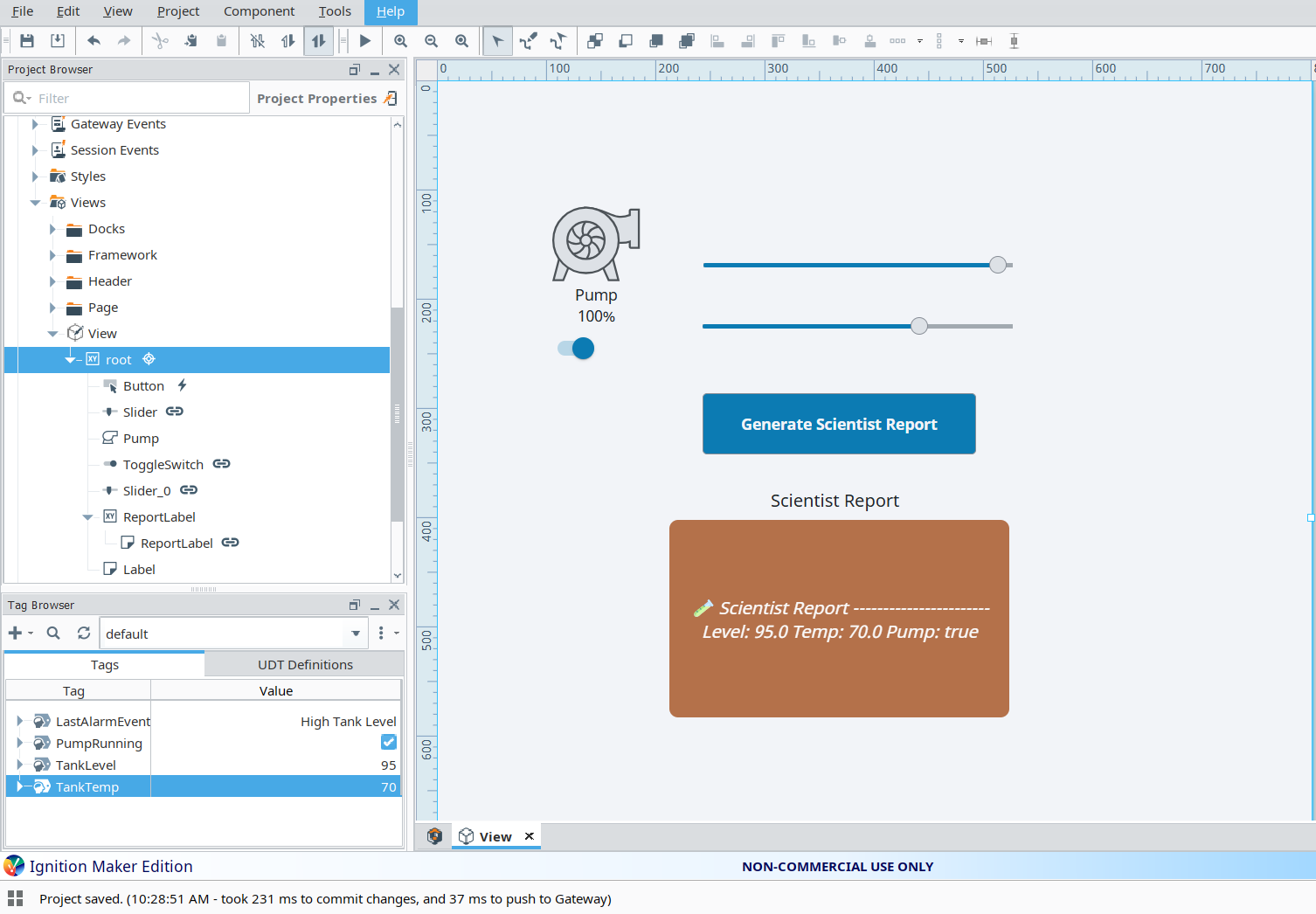
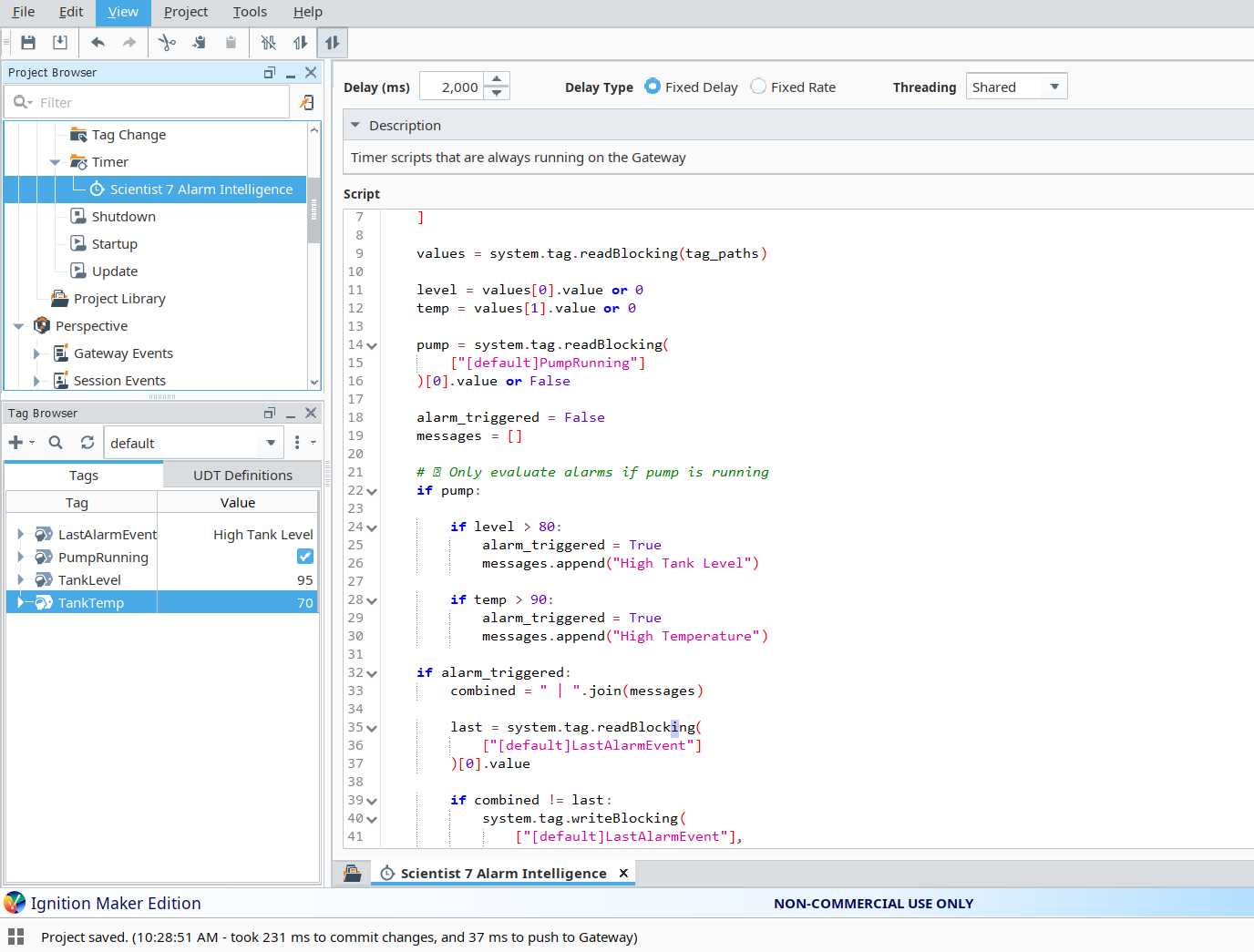
The Tag Browser confirms the live state at the moment of capture:
LastAlarmEvent = "High Tank Level", PumpRunning = true,
TankLevel = 95, TankTemp = 70. The alarm fired
correctly because the pump was running and the level exceeded the threshold of 80.
Gateway Timer Script — Alarm Intelligence Logic
# Scientist 7 Alarm Intelligence
# Gateway Timer Script - Fixed Delay 2,000 ms, Shared threading
# Reads tank state, evaluates alarms, persists most recent event

tag_paths = [
    "[default]TankLevel",
    "[default]TankTemp"
]

values = system.tag.readBlocking(tag_paths)

level = values[0].value or 0
temp  = values[1].value or 0

pump = system.tag.readBlocking(
    ["[default]PumpRunning"]
)[0].value or False

alarm_triggered = False
messages = []

# Only evaluate alarms if pump is running
if pump:

    if level > 80:
        alarm_triggered = True
        messages.append("High Tank Level")

    if temp > 90:
        alarm_triggered = True
        messages.append("High Temperature")

if alarm_triggered:
    combined = " | ".join(messages)

    last = system.tag.readBlocking(
        ["[default]LastAlarmEvent"]
    )[0].value

    # Only write if state has actually changed
    if combined != last:
        system.tag.writeBlocking(
            ["[default]LastAlarmEvent"],
            [combined]
        )
Engineering Decisions Worth Calling Out
A few choices in this script reflect deliberate SCADA design thinking rather than just "make it work":
-
Pump-gated alarm evaluation. Alarms only fire when
PumpRunningis true. This prevents nuisance alarms during planned shutdowns — a tank sitting at 95% when the pump is off is expected, not an emergency. -
Batched tag reads.
TankLevelandTankTempare read in a singlereadBlocking()call rather than two separate calls, reducing round-trip overhead on every cycle. -
Conditional writes (
combined != last). The script only writes toLastAlarmEventwhen the alarm state has actually changed. Without this check, the Gateway would write the same value every 2 seconds forever, polluting the historian and creating unnecessary tag-change events for any subscribers. -
Multi-alarm string composition. If both level and
temperature exceed thresholds simultaneously, both messages are joined into
a single string with
" | "rather than overwriting one another. The operator sees the full picture, not just the last one evaluated. -
Defensive defaults (
or 0,or False). If a tag returns a null value during startup or a brief disconnect, the script falls back to safe defaults rather than throwing and halting the timer.
Testing & Debugging
I tested the system by toggling the pump and dragging the sliders to drive
TankLevel and TankTemp across their thresholds, then
watching the Tag Browser to confirm LastAlarmEvent updated as expected.
- With pump off and level at 95: no alarm fired (correct — gated by pump state)
- With pump on and level above 80:
LastAlarmEventupdated to "High Tank Level" - With pump on, level above 80, and temp above 90: value updated to "High Tank Level | High Temperature"
- Holding values steady at the same alarm state: no further writes occurred (conditional write working)
The Perspective view's "Generate Scientist Report" button rendered the formatted output to the Label, reading back the same tag values that the Gateway Timer Script was evaluating. This confirmed the full loop: operator input → tag system → Gateway evaluation → UI render.
Challenges Faced
The most important conceptual challenge was deciding where the alarm logic belonged. My first instinct was to put it on the Perspective button click event, since that's where the report gets generated. I had to step back and recognize that alarm evaluation cannot live in the client scope — otherwise alarms would only be detected when an operator happened to click the button. Moving it into a Gateway Timer Script was the correct architectural fix.
The second challenge was avoiding redundant writes. Without the
combined != last check, the script was writing the same alarm
string into LastAlarmEvent on every 2-second cycle, even when
nothing had changed. Adding the comparison made the writes meaningful and kept
the tag history clean.
Key Learning Outcomes
- Designing across Ignition's Perspective Session and Gateway execution scopes
- Building Gateway Timer Scripts for continuous, session-independent process monitoring
- Using
system.tag.readBlocking()andsystem.tag.writeBlocking()for batched, reliable tag I/O - Threshold-based alarm classification with state-gated evaluation
- Avoiding redundant writes through change detection on persistent state tags
- Composing multi-alarm messages instead of overwriting
- Defensive scripting with safe fallbacks for null tag values
- Architectural separation of UI concerns from process logic
Tools & Technologies
- Ignition Maker Edition (Perspective Module)
- Ignition Designer
- Jython scripting
- Memory Tags (LastAlarmEvent, PumpRunning, TankLevel, TankTemp)
- Gateway Timer Scripts (Fixed Delay, Shared threading)
- Perspective components (Button, Slider, Pump symbol, ToggleSwitch, Label)
- Tag Browser for live state inspection